-
commander를 이용한 JS CLI 라이브러리 File Output 생성하기JavaScript 2024. 6. 16. 14:21
종종 CLI 기능이 있는 라이브러리를 사용하면, 파일을 생성해주는 기능이 있는 경우를 종종 봤다.
이번에는 이를 어떻게 구현할 수 있을지 직접 만들어봤다.
작성한 colors-helper-tools 라이브러리의 cli 코드이다.

빨간색으로 테두리친 부분이 CLI 코드에서 실제로 file output을 생성하는 부분이다.
-f나 --file 옵션을 사용하면, 파일을 생성한다.
이때, 파일 이름은 중복이 일어나면 에러가 발생할 수 있다.
때문에 현재 시간을 이용하여 파일을 만듦으로써 중복을 방지한다.
/**
 *
 * @param prefix file name prefix
 * @param extension file_name.extension
 * @returns file name String
 */
const generateFileName = (prefix: string, extension: string): string => {
  const now = new Date();
  const timestamp = now.toISOString().replace(/[:.]/g, '-');
  return `${prefix}-${timestamp}.${extension}`;
};
이렇게 생성한 파일 이름으로 실제 코드를 파일로 생성하는 건 다음과 같이 구현할 수 있다.
/**
 *
 * @param filePath file output path
 * @param content String to output
 */
const writeStringToFile = (filePath: string, content: string): void => {
  fs.writeFile(filePath, content, err => {
    if (err) {
      console.error('Error writing to file:', err);
    } else {
      console.log('File has been written successfully.');
    }
  });
};
이렇게 구현이 완료된 코드는 다음과 같은 CLI 명령어로 실행해볼 수 있다.
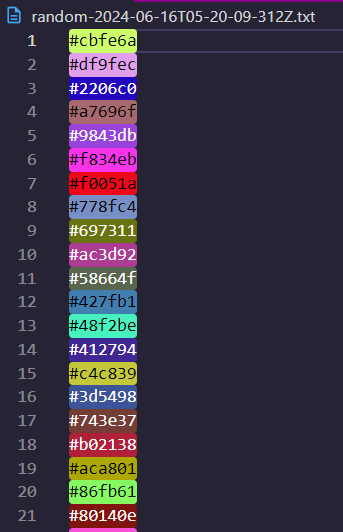
npx cht random 100 -f실제로 실행해보면, 100개의 hex 색상이 하나의 txt 파일에 쓰여진다.
🍎 참고 자료
https://www.npmjs.com/package/colors-helper-tools
colors-helper-tools
help use color style ✨. Latest version: 1.6.9, last published: 8 minutes ago. Start using colors-helper-tools in your project by running `npm i colors-helper-tools`. There are no other projects in the npm registry using colors-helper-tools.
www.npmjs.com
'JavaScript' 카테고리의 다른 글
TextEncoder를 활용하여 텍스트 인코딩하기 (문자열 byte 계산하기 🎶) (1) 2024.11.07 자바스크립트 Proxy 객체를 사용해서 State 만들어 보자 (0) 2024.08.25 번들러 Rollup 세팅해보기 (2) 2024.06.07 commander.js를 사용한 js CLI 라이브러리 구현 (with 예제) (0) 2024.06.04 브라우저 window.navigation 객체로 히스토리 관리하기 (1) 2024.04.07